Diagnose slow drives, bad cables, and under-powered chargers
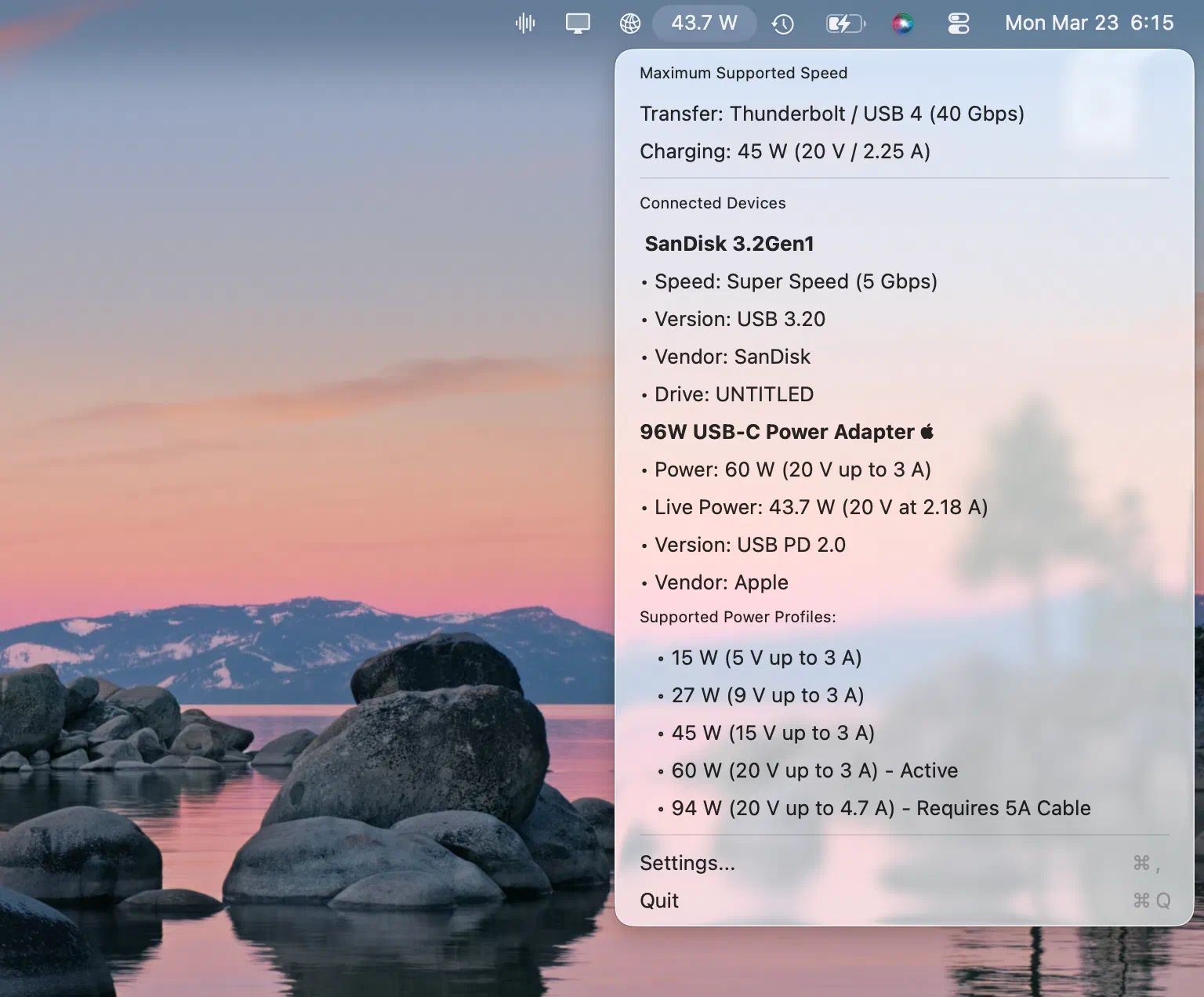
See real speeds, live power, and USB-C PD profiles right from your menu bar. Don't let a bad cable bottleneck your workflow.


iOS version has officially been released and is included with Mac App Store purchase!
The same app, on every platform you use
macOS, Windows, and Linux - each built natively for its platform, with the menu-bar or tray experience that feels at home.


Everything you plug in, at a glance
Lives in your menu bar. Surfaces exactly what you need the moment a device connects.
Real speeds, instantly
The real negotiated speed the moment you plug in, plus what the cable is rated for.
USB-C Power Delivery
Voltage, current, and wattage for every USB-C charger profile. (macOS only)
Smart device ID
Names the manufacturer, with 100% coverage of USB-IF registered vendors.
Alerts when something's wrong
Get notified when a cable slows a device down or it disconnects.
Customizable menu bar and tray
Show an icon, live speed, or device count (name or count on Windows).
Private by design
No telemetry, no analytics, no cloud. Your data stays on your computer.
Stop buying cheap USB multimeters
Why spend $16.99 on a plastic dongle when your Mac already knows what's happening?
Physical Tester
Costs $16.99+ per port

- close Will not last the length of your Mac
- close Bulky and blocks adjacent ports
- close Only measures electrical current, missing OS data
USB Connection Info
$9.99 once, yours forever
- check Native app that lasts the lifetime of your machine
- check Monitors every single port simultaneously
- check Shows true OS-level connection speeds and PD profiles
Chargers tested and measured. And counting.
Rated wattage is a claim on a box. Every charger here goes on the bench: the profiles it advertises, the contract it actually negotiates, and the power it really delivers - all published, all repeatable.
See it in action


What people are saying
“Finally I can see what voltage and amperage my charger puts out - without reaching for my USB-C PD multimeter. You are an international treasure.”
“Finally I can know the charging speed of my cable without needing a tester. Love the app.”
“I can finally see what my cables and chargers are actually doing. Fast, clear, and lightweight.”
“A game changer. I can instantly see everything about my USB devices right from the menu bar.”
“Sits in the menu bar and surfaces the info the moment any USB is plugged in. No subscription. Totally worth it.”
“Super useful and surprisingly full-featured - it easily replaces $10 worth of hardware. I particularly like the ‘notify me if a cable is limiting transfer speed’ feature.”
No data collected. Period.
Your device data never leaves your machine - no telemetry, no analytics, no cloud.
Frequently asked questions
Is it a subscription?
What macOS version is required?
What Windows version is required?
Does it work with USB hubs?
What about USB-C and Thunderbolt?
How does device identification work?
Part of the Connection Information Suite
Four focused menu-bar utilities for real visibility into your Mac. Get them together at a discount.


Know your USB speeds in seconds
$9.99 per platform · One-time · No subscription
iOS version has officially been released and is included with Mac App Store purchase!